


Thursday, September 30, 2010
If You Give a Kid a Book
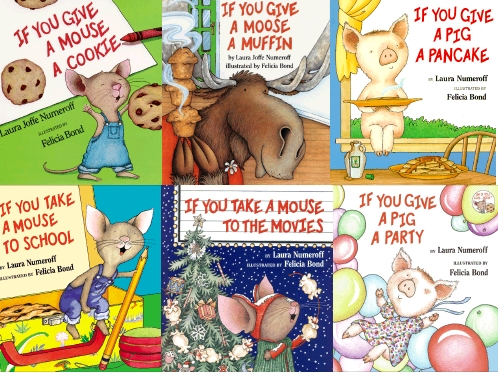
Second Grade started the school year learning about circular stories, like those written by Laura Numeroff. Side note - when did she drop Joffe from the middle? I talked about the idea of a circular story ending up right where it began and talked about how a library is like that. We check out books, enjoy them, have adventures, and then the books (fingers crossed) end up in the library, right where they began. Students then created class book pages for a book titled "If You Give a Kid a Book" to review book care and library manners. We used a Google Docs presentation to create each page and I typed the student's words using a wireless keyboard connected to our smartboard computer. Similar to the Language Experience Approach, typing student's word on the big screen gives them an opportunity to see their words recorded and keeps students engaged in what is happening with whole group instruction.


Monday, September 13, 2010
Take a Magic Tree House Trip
Third Graders are re-acquainting themselves with the library shelves this fall by taking a Magic Tree House-esque trip through the Dewey Decimal System. Well, actually the activity has now been modified several times over due to the construction and continued "debris", but here was the original plan and one I hope to execute much better in the future. Each student would start out with a Magic Tree House Title (after discussing some of the elements of the series, i.e. Jack and Annie always find a book in the tree house that takes them to the time and place that the plot centers around) and go to the shelves to find a book that might have taken Jack and Annie to that time or place. For example, to get to the title, "Tonight on the Titanic," they might have opened up a book about the Titanic. Once each student has a sample non-fiction book, we can discuss in groups what the DDS numbers mean and group kids together with numbers that are close and figure out what those titles have in common. So, I thought this would be a great plan. Then reality hit and the shelves were still blocked by technological fallout and a huge papier machie dinosaur. So, we did this activity in a similar fashion with cards with the titles printed as getting all the books off the shelves without tables to seat each student didn't seem entirely wise either. Maybe by Thursday's class, we'll be able to do this activity in its intended fashion. Maybe. No promises.


Take a magical trip in your library - read a great book!!
Sunday, September 12, 2010
Word Up
4th and 5th Graders have Summer Reading. As a way to review what books kids read, each class did two activities, each catered to that grades list. For the first activity, we did a circle and each student told the class his/her favorite summer reading book from the list. At the same time, I typed the book titles into a list on a word document. Then, we copied and pasted the list into Wordle. And, voila!

Following the circle and wordle creation lesson, students also created a scavenger hunt that included finding students who had read certain books, the authors of certain books, or the names of characters from those books. The students seemed engaged and voted to continue the activity during the next class period to have more time to complete as many boxes as possible.
I plan to create a bulletin board to showcase the wordle that each class created. Pretty neat summary activity for summer reading!
Saturday, September 11, 2010
Pirate Book Buddy Bag

So, I won a prize for the library - hopefully the first of many such contests/grants that help to benefit our students. I won a Book Buddy Bag that pairs two pirate books - one fiction and one non-fiction. I can't wait to use this with students! When I wrote my entry for the contest, I explained that this would be used in a school library to celebrate Talk Like a Pirate Day on and around September 19th. I got this idea from another awesome librarian, Bev Keegan, of Mill Creek Elementary. She used it as a fiction/non-fiction lesson with pirate hooks. They had fiction on one side and non-fiction on the other. Kids flipped them to display which kind of book was being shown. I'll be trying this out with first graders starting next Friday...if the hooks are ready. Fingers, or hooks, crossed! Listed below is the information for Links to Literacy, the sponsor of the contest - thanks!!!
Web: www.linkstoliteracy.com
Twitter: www.twitter.com/
Blog for Educators: www.teachingwithpicturebooks.
Blog for Parents: www.literacytoolbox.wordpress.
Creator of My Book Buddy Bag: http://www.
Thursday, August 26, 2010
Tech Shop
As a tech leader, I try to stay ahead of the curve as much as possible. When I was presented the opportunity to attend Act 48 workshops for free I took it. In addition to trainings offered through my school district's summer professional development for free, there were also funds available from a PDE Act 183e Grant to take certain technology workshops at MCIU. Which is where I am right now...and where I was on Monday afternoon.
 After reviewing MyLearningPlan I realized that I have spent 31.5 hours this summer in technology workshops. Phew. I'm actually in one RIGHT NOW learning about...blogs, wikis, and forums. I like to attend workshops on topics I don't know about...and topics I DO know about, like...blogging. The thing about technology is that the more things change, the more they...change. Technology is never static, never stable. There is always something to learn. These workshops also afford me the time to play with applications that I may have been really meaning to get to, but there is always, always, always something else. For example, I just learned about technorati. I had heard the word before, but never investigated further. Technorati is a search engine for blogs. And I'm not there...that will have to be remedied. Soon. I'm pretty sure I have to start tagging my posts. I'll get to that...one day. I also played, just now, on Curriki.org a site I signed up for during its inception when there was absolutely NO content. Now it is full to brimming with great ideas, even for teaching lessons in the library. So I'll have to get back there. I added both Technorati and Curriki to my Diigo page which will automatically update to the Delicious page as well.
 So, what else have I been doing for 31.5 hours?!?
After reviewing MyLearningPlan I realized that I have spent 31.5 hours this summer in technology workshops. Phew. I'm actually in one RIGHT NOW learning about...blogs, wikis, and forums. I like to attend workshops on topics I don't know about...and topics I DO know about, like...blogging. The thing about technology is that the more things change, the more they...change. Technology is never static, never stable. There is always something to learn. These workshops also afford me the time to play with applications that I may have been really meaning to get to, but there is always, always, always something else. For example, I just learned about technorati. I had heard the word before, but never investigated further. Technorati is a search engine for blogs. And I'm not there...that will have to be remedied. Soon. I'm pretty sure I have to start tagging my posts. I'll get to that...one day. I also played, just now, on Curriki.org a site I signed up for during its inception when there was absolutely NO content. Now it is full to brimming with great ideas, even for teaching lessons in the library. So I'll have to get back there. I added both Technorati and Curriki to my Diigo page which will automatically update to the Delicious page as well. So, what else have I been doing for 31.5 hours?!?- Intro to Smartboard Notebook 10 - Why the New Version? (again, I am relatively well-versed in Smartboard, but since mine was delivered mid-way through September there was no "official" training, so this offered the opportunity to review post-maternity leave year and to learn about updates to the program.)
- Moodle Overview (Moodle proved to be relatively non-applicable to me and something I didn't see an application for at my level/position. It seemed more geared to online course creation.)
- Lead Teacher Workshop (Mandatory)
- Solo Software (A program that our district subscribes to that "reads out loud" for students on the web and on ebooks. It also has a component to "write out loud" with students as well as many other awesome applications that can be utilized by students with special needs OR any students who might take advantage of these tools.)
- Using Google Docs in the Classroom and to Organize Your Life (While I already used Google Docs, I learned more about the available templates and the opportunity to write live in real time on the same document with a collaborative group. I've now created spreadsheets to keep track of budgetary expenses and a calendar for school as well as a document to input all my lesson plans. Starting from scratch has its benefits!)
- Restorative Practices Book Club (A new program for school wide community building - an initative for this fall and an opportunity to talk about it.)
- Elluminate (A tool for online learning - I had a class two days later utilizing elluminate so this refresher reminded me of some important aspects and helped me to familiarize myself with elluminate.)
- Safari Montage (A video program that our school is subscribed to starting this year. We will continue to have a year of overlap with Discovery Education United Streaming, but this should offer us a place to upload our TV Studio morning show for students to watch from archives.)
- Wikis, Blogs, and Forums (Here...right now...)
Wednesday, August 4, 2010
Murphy's Law of Blogging and Technology
As soon as I sing any praises, problems arise. Shelfari is giving me trouble logging in and staying logged in for any stretch of time long enough to input some information. This is the same thing that happened when I first signed up for the account. Patience. Has anyone else experienced this glitch?
Next Up In the Ring: Library Thing vs/ Shelfari
And it's a knockout! A few years back, again while in my class with Calvin Wang at Arcadia, I learned about a tool called Library Thing and it changed my life. That may be overstating its impact, but sincerely. I've always been a reader and had begun a while back keeping a reading journal, after I started a book club, yes...I am a book geek. And I'm not ashamed of that at all.
Regardless, Library Thing became my fascination with uploading all my books, and indicating books I would like to read. This was really the kicker for me, because in general my "to-read" list has always been a bit unmanageable. Since that time, I've had a baby and tracking my reading has fallen a bit by the wayside, though since "What to Expect When You're Expecting" is listed as one of my last entries into my personal Library Thing, I can tell that I was ever vigilant up until the point that darned baby (just kidding) made her appearance on the scene. So, in class I created my own Library Thing and added a widget to my own personal blog. This was also my first experience with widgets and the beginning of an obsession. I'm sure that apps will be a similarly pre-occupying habit once we get our iPhones this week (p.s. I'm getting an iPhone this week!!!).
So, I had a personal Library Thing. I also created a "faux" school library account under the name...ontheshelf4kids as part of a group project, but I thought of the name and was quite proud of it, so I have no reservations continuing to use it for my own professional blog/twitter/library thing/shelfari (we'll get there in a bit)/delicious/diigo/flickr/image chef, etc. etc. accounts. So, I had planned to utilize the Library Thing account to build my own reviews of children's lit as I read it and utilized it in my school library. Then, I read not once but twice about a limit for a free account of 200 books. Now, I'm not one to pay for something if I don't have to, so this gave me pause. I decided to check out the competitors. Shelfari and Goodreads. Shelfari looked great, but I had trouble signing up for my account and subsequently actually signing in. Hmmm. Goodreads didn't look all that....good...to me. So, I went along my merry way.
Later, I went back to Shelfari and successfully logged in. I was IN LOVE. I thoroughly enjoy gimmicks and the shelving in Shelfari is just, well, cute. The visual appeal is huge and if you're going to judge a book by its cover, you might as well do it on Shelfari. You can create reviews, edition notes, tags, and indicate if you plan to read, are currently reading, or have already read the selected title. There is also a widget to embed, though I haven't gotten around to that step just yet. I've also created a FB page for ontheshelf4kids and wanted to add the visual bookshelf there. I have one on my personal FB page, but haven't been able to add a tab to the ontheshelf4kids page. Worst case scenario is that I link it to Shelfari and that's not a bad case scenario at all as it will prevent me from unnecessarily double uploading to both Shelfari and FB (which is a personal problem with Snapfish and FB, but I digress).
Also, my district recently invested in Follett Destiny upgrade to our circulation system, linking all three buildings in the district. It seems that Destiny has many of these capabilities housed at Shelfari, such as review-writing, rating, and tagging might just be referred to as subject search :). As I learn more about Destiny, Shelfari may become less vital, but for now, I enjoy its capabilities. I can tag books that I'd like to use for lessons so that I can search for them later. And I don't have to pay (ahem Library Thing). And last but not least, the sharing capabilities of a site like Shelfari will, hopefully, offer guidance for other librarians or teachers looking for a "good read" with some information about lessons as well. Shelfari is the winner in my book (pun intended)!
Regardless, Library Thing became my fascination with uploading all my books, and indicating books I would like to read. This was really the kicker for me, because in general my "to-read" list has always been a bit unmanageable. Since that time, I've had a baby and tracking my reading has fallen a bit by the wayside, though since "What to Expect When You're Expecting" is listed as one of my last entries into my personal Library Thing, I can tell that I was ever vigilant up until the point that darned baby (just kidding) made her appearance on the scene. So, in class I created my own Library Thing and added a widget to my own personal blog. This was also my first experience with widgets and the beginning of an obsession. I'm sure that apps will be a similarly pre-occupying habit once we get our iPhones this week (p.s. I'm getting an iPhone this week!!!).
So, I had a personal Library Thing. I also created a "faux" school library account under the name...ontheshelf4kids as part of a group project, but I thought of the name and was quite proud of it, so I have no reservations continuing to use it for my own professional blog/twitter/library thing/shelfari (we'll get there in a bit)/delicious/diigo/flickr/image chef, etc. etc. accounts. So, I had planned to utilize the Library Thing account to build my own reviews of children's lit as I read it and utilized it in my school library. Then, I read not once but twice about a limit for a free account of 200 books. Now, I'm not one to pay for something if I don't have to, so this gave me pause. I decided to check out the competitors. Shelfari and Goodreads. Shelfari looked great, but I had trouble signing up for my account and subsequently actually signing in. Hmmm. Goodreads didn't look all that....good...to me. So, I went along my merry way.
Later, I went back to Shelfari and successfully logged in. I was IN LOVE. I thoroughly enjoy gimmicks and the shelving in Shelfari is just, well, cute. The visual appeal is huge and if you're going to judge a book by its cover, you might as well do it on Shelfari. You can create reviews, edition notes, tags, and indicate if you plan to read, are currently reading, or have already read the selected title. There is also a widget to embed, though I haven't gotten around to that step just yet. I've also created a FB page for ontheshelf4kids and wanted to add the visual bookshelf there. I have one on my personal FB page, but haven't been able to add a tab to the ontheshelf4kids page. Worst case scenario is that I link it to Shelfari and that's not a bad case scenario at all as it will prevent me from unnecessarily double uploading to both Shelfari and FB (which is a personal problem with Snapfish and FB, but I digress).
Also, my district recently invested in Follett Destiny upgrade to our circulation system, linking all three buildings in the district. It seems that Destiny has many of these capabilities housed at Shelfari, such as review-writing, rating, and tagging might just be referred to as subject search :). As I learn more about Destiny, Shelfari may become less vital, but for now, I enjoy its capabilities. I can tag books that I'd like to use for lessons so that I can search for them later. And I don't have to pay (ahem Library Thing). And last but not least, the sharing capabilities of a site like Shelfari will, hopefully, offer guidance for other librarians or teachers looking for a "good read" with some information about lessons as well. Shelfari is the winner in my book (pun intended)!
Subscribe to:
Posts (Atom)